Back-in-Stock Alerts & Wishlists: A Better Way to Re-Engage Shopify Shoppers
Running out of stock is a normal part of eCommerce. A popular product can sell faster than expected, seasonal demand can increase suddenly, or supply chain delays can leave shoppers waiting.
The problem is what happens next.
When customers find their preferred product unavailable, many will simply leave the store and look somewhere else. Without a way to remind them when the product becomes available again, your business may lose a potential sale permanently.
This is where Shopify wishlists and back-in-stock alerts can work together.
A wishlist gives shoppers a way to save products they are interested in, while a back-in-stock alert gives them a reason to return when those products become available. Shopify wishlists give customers an easy way to save products they want to purchase later while helping stores capture ongoing purchase intent.
What Are Back-in-Stock Alerts?
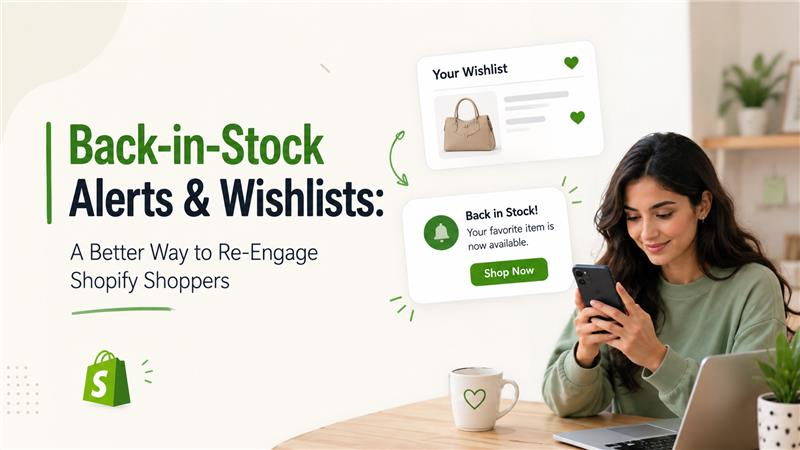
A back-in-stock alert is a notification that informs customers when a product they wanted to purchase becomes available again.
For example, imagine a customer visits your Shopify store and finds a pair of shoes they like. Their preferred size is sold out, so they cannot complete the purchase.
Instead of leaving without taking any action, the customer can select “Notify Me When Available.”
Once the product or selected variant is restocked, the customer receives a notification and can return to the store to complete the purchase.
Depending on the Shopify app or setup, notifications may be delivered through channels such as:
- SMS
- Push notifications
- WhatsApp or other messaging channels
The exact options depend on the tools and integrations used by the store.
Why Combine Wishlists With Back-in-Stock Alerts?
A wishlist and a back-in-stock notification solve different problems.
A wishlist answers:
“Which products does this customer want to remember?”
A back-in-stock alert answers:
“When should we remind this customer to come back?”
When the two features work together, the customer journey becomes more useful.
For example:
Customer discovers product → Saves it to wishlist → Product goes out of stock → Product is restocked → Customer receives notification → Customer returns → Customer purchases
Without a notification, the customer may never know that the product is available again.
This combination is especially valuable for products with frequent stock fluctuations.
How Back-in-Stock Alerts Help Shopify Stores Re-Engage Shoppers
1. Recover Sales From Out-of-Stock Products
An out-of-stock product does not necessarily mean a lost customer. By allowing shoppers to request a notification, your store can reconnect with them when the product becomes available again. Instead of making customers repeatedly check your website, a timely alert lets them know when the product is back in stock and ready to purchase.
2. Bring Interested Shoppers Back
Not every website visitor is ready to buy immediately.
A customer who saves a product or requests a restock notification has already shown interest. Reaching this customer later can be more effective than trying to attract an entirely new visitor.
This makes back-in-stock alerts a useful re-engagement strategy.
3. Create a Better Customer Experience
Customers generally do not want to keep checking whether a sold-out product is available again.
A simple notification option removes that inconvenience.
Instead of saying only:
“Out of Stock”
a store can provide a more helpful option:
“Notify me when available.”
This small change can make the shopping experience feel more customer-focused.
4. Increase the Value of Your Wishlist
A wishlist becomes more useful when it does more than simply save products.
If customers can receive relevant notifications about saved products, the wishlist becomes an ongoing part of the shopping journey.
Wishlist vs. Back-in-Stock Alerts: What's the Difference?
Although they are often used together, these features have different purposes.
| Feature | Wishlist | Back-in-Stock Alert |
|---|---|---|
| Main purpose | Save products for later | Notify customers when inventory returns |
| Customer action | Saves an item | Requests a notification |
| Best for | Future purchase intent | Re-engaging shoppers after stockouts |
| Trigger | Customer saves product | Product becomes available |
| Primary benefit | Product discovery and consideration | Recovering potential sales |
The two features complement each other rather than replacing one another.
When Should a Shopify Store Use Back-in-Stock Alerts?
Back-in-stock alerts can be particularly useful when a store sells products that frequently become unavailable.
They may be valuable for:
Fashion & Apparel
Popular sizes and colors can sell out quickly. Customers may still want the product when their preferred variant returns.
Beauty & Cosmetics
Frequently purchased or trending products may experience temporary stock shortages.
Electronics
Popular devices, accessories, and limited inventory products can generate significant interest before stock becomes available again.
Home & Lifestyle
Furniture, decor, kitchen products, and other popular items may have longer replenishment cycles.
Limited-Edition Products
Customers who miss a product release may want to know if additional inventory becomes available.
When Should You Use a Wishlist?
Wishlists are useful even when products are fully in stock.
They can help shoppers organize products they are considering and return to them later.
A wishlist can be particularly useful for stores with:
- Large product catalogs
- Higher-priced products
- Seasonal collections
- Frequent product comparisons
- Returning customers
- Products commonly purchased as gifts
How to Build an Effective Re-Engagement Journey
Simply installing a wishlist or notification feature is not enough. The experience should be easy for customers to understand.
A practical journey could look like this:
Step 1: Make the Wishlist Easy to Find
Place the wishlist option where shoppers naturally look for it, such as near the product image, product title, or add-to-cart area.
The icon and label should be clear enough that customers immediately understand its purpose.
Step 2: Add a Clear Back-in-Stock Option
When a product is unavailable, don’t leave customers with a dead end.
Instead, provide a visible option such as:
Step 2: Add a Clear Back-in-Stock Option
When a product is unavailable, don’t leave customers with a dead end.
Instead, provide a visible option such as:
Notify Me When Available
Keep the signup process simple.
Step 3: Collect Only Necessary Information
Avoid asking customers to complete a long form just to receive an availability notification.
A simple email field may be enough, depending on your notification system.
Step 4: Send the Notification Promptly
When inventory is updated, the notification should be sent according to the configuration of the chosen app or system.
Timing matters because popular products can sell out again quickly.
Step 5: Make Returning to the Product Easy
The notification should take customers directly to the relevant product or variant whenever possible.
The fewer steps between the notification and purchase, the better.
What Should a Back-in-Stock Email Include?
A back-in-stock notification does not need to be complicated.
A useful message can include:
Subject: The Product You Wanted Is Back in Stock
Message:
The product you’ve been waiting for is available again.
[Product Name]
Your requested item is back in stock. Visit the store to check availability and complete your purchase.
Shop Now
You can also include the product image, price, selected variant, and other relevant information.
The goal is to make the message immediately useful rather than turning it into a generic promotional email.
Best Practices for Shopify Wishlist and Back-in-Stock Features
Keep the Experience Simple
When inventory is updated, the notification should be sent according to the configuration of the chosen app or system.
Timing matters because popular products can sell out again quickly.
Support Product Variants
For products with different sizes, colors, or configurations, notifications should ideally account for the specific variant a customer wants.
Make Notifications Relevant
Customers should receive alerts for products they actually showed interest in.
Irrelevant messages can reduce engagement and make customers less likely to interact with future communications.
Avoid Over-Notification
More notifications do not necessarily mean better engagement.
Use alerts thoughtfully and avoid sending unnecessary messages for every small product change.
Optimize for Mobile
Many Shopify shoppers browse and purchase through mobile devices.
Wishlist buttons, notification forms, emails, and product pages should all provide a smooth mobile experience.
Track Performance
Monitor metrics such as:
- Number of wishlist additions
- Back-in-stock subscriptions
- Notification open rates
- Click-through rates
- Purchases after notifications
- Conversion rate from notification traffic
- Products generating the most demand
These insights can help merchants understand customer interest and inventory demand.
Common Mistakes to Avoid
Only Showing "Out of Stock"
If customers have no way to express interest, the store may lose the opportunity to reconnect with them.
Making Signup Complicated
A lengthy form can discourage shoppers from requesting notifications.
Ignoring Variant-Level Availability
A product may be back in stock while the customer’s preferred size or color remains unavailable.
Sending Generic Notifications
A useful alert should clearly tell customers what became available and make it easy to find the product.
Forgetting the Wishlist Experience
If the wishlist is difficult to access or use, customers may not return to it.
Are Wishlists and Back-in-Stock Alerts Worth Adding to a Shopify Store?
For many Shopify stores, these features can be valuable because they address two common challenges: purchase intent that isn’t ready yet and products that aren’t currently available.
A wishlist helps preserve shopping intent.
A back-in-stock alert helps reactivate that intent when inventory becomes available.
Together, they create a simple re-engagement loop:
Discover → Save → Wait → Get Notified → Return → Purchase
The key is not simply adding more features to a Shopify store. The goal is to remove friction from the customer’s buying journey and give interested shoppers a reason to return.
Final Thoughts
Customers who encounter an out-of-stock product are not necessarily lost customers. They may still want the product, but they need a convenient way to know when it becomes available.
That’s where wishlists and back-in-stock alerts become useful.
Wishlists help customers save products they care about, while back-in-stock notifications bring them back when those products are available again. When implemented thoughtfully, the combination can improve the shopping experience, support customer re-engagement, and help Shopify merchants recover potential sales from temporary stockouts.
For merchants, the bigger opportunity is understanding the intent behind these actions. A wishlist save or restock request is a signal that a shopper is interested. Using that signal responsibly can help create a more relevant and customer-friendly shopping experience.
People Also Ask
1. What are back-in-stock alerts in Shopify?
Back-in-stock alerts notify customers when a product or specific product variant they wanted is available again. They give shoppers an easy way to return to the store instead of repeatedly checking product availability.
2. How do back-in-stock alerts work with Shopify wishlists?
A wishlist lets customers save products they are interested in, while a back-in-stock alert can notify them when a saved or requested product becomes available. Together, they help Shopify stores maintain customer interest and encourage shoppers to return.
3. Can customers receive notifications for specific product variants?
Yes, depending on the Shopify wishlist or back-in-stock app being used. Some solutions can track specific variants, such as a particular size, color, or configuration, and notify customers when that variant is restocked.
4. Do Shopify wishlists help increase sales?
Wishlists can support sales by allowing customers to save products they are considering for a future purchase. When combined with relevant notifications, they can encourage shoppers to return and complete their purchases.
5. What notification channels can Shopify stores use for back-in-stock alerts?
Depending on the app and its integrations, Shopify stores may offer notifications through email, SMS, push notifications, or other messaging channels. Available options vary between solutions.
6. Are back-in-stock notifications useful for Shopify stores with frequently sold-out products?
Yes. They can be particularly useful for stores where popular products, sizes, or variants regularly sell out. Notifications give interested shoppers a convenient way to know when inventory becomes available again.
7. Can wishlist data help Shopify merchants understand customer demand?
Yes. Wishlist activity can provide useful insight into which products customers are interested in. When combined with sales, inventory, and other business data, these signals can help merchants better understand customer demand.
8. Should every Shopify store add a wishlist and back-in-stock feature?
Not necessarily. The value depends on the store’s products, catalog size, customer buying behavior, and frequency of stockouts. Stores with products that require consideration or frequently go out of stock may benefit the most from these features.

About The Author
Akshita Dubey is an SEO Executive at eWebWorld with expertise in search intent analysis and content optimization. She focuses on creating user-centric content that simplifies complex technology topics, helping businesses and decision-makers understand web development, mobile apps, and digital solutions through clear, research-based insights.
Search
Popular Posts
Follow us

Recent Posts
About eWebWorld
eWebWorld is a Shopify and eCommerce development company in India with 10+ years of experience building and scaling online stores. We specialize in Shopify development, including store setup, customizations, theme development, migrations, integrations, and performance optimization. Through our expertise in eCommerce, technology, and digital marketing, we help businesses create better online experiences and achieve sustainable growth.